Technical SEO Checklist 2026: The Hidden Website Factors That Decide Your Google Rankings
A website can have copy, credible links and a clear offer and still lose organic traffic because Google cannot reliably crawl, render or trust its pages. Technical SEO removes those barriers. It is not glamorous. It often decides whether a strong page gets a fair chance to rank.
This guide is built for teams that need to know what to check, what to fix with a developer and what can wait. The aim is not to chase an audit score. It is to make important pages fast, accessible, understandable and easy for search engines to revisit.
What Has Changed in Technical SEO
The basic rules still apply: Google needs to discover a URL crawl, render it, understand it and decide that it deserves a place in the index. What has changed is the complexity of websites. JavaScript frameworks, consent platforms, third-party tools, faceted navigation and constantly changing templates can interfere with any point in that chain.
At the time searchers are meeting brands through richer results and AI-assisted answers before they ever visit a site. Clean entity information, useful structured data, fast delivery and content that is available in the HTML give both conventional search and AI-driven systems a clearer view of what a business offers.
Start With the Pages That Matter Commercially
A technical audit becomes expensive when every warning is treated as urgent. Begin with the URLs that drive revenue or lead generation: product and category pages, service pages, location pages performing articles and conversion paths. Then ask a question: can a new visitor and Google reach, load and understand these pages without friction?
For example an accounting firm may have 200 blog posts but six core service pages. If the service pages are buried in navigation blocked by a noindex tag or slow on mobile, repairing image alt text on old posts should not be the first priority.
SEO Technical Checklist 2026: Crawlability and Indexation
Make URLs Easy to Discover
Google cannot rank a page it cannot find. Important URLs should be linked from navigation, category hubs or contextual internal links. A page that only appears in an XML sitemap is technically discoverable. It doesn't have the same degree of integration with the site as a page backed by meaningful inbound links.
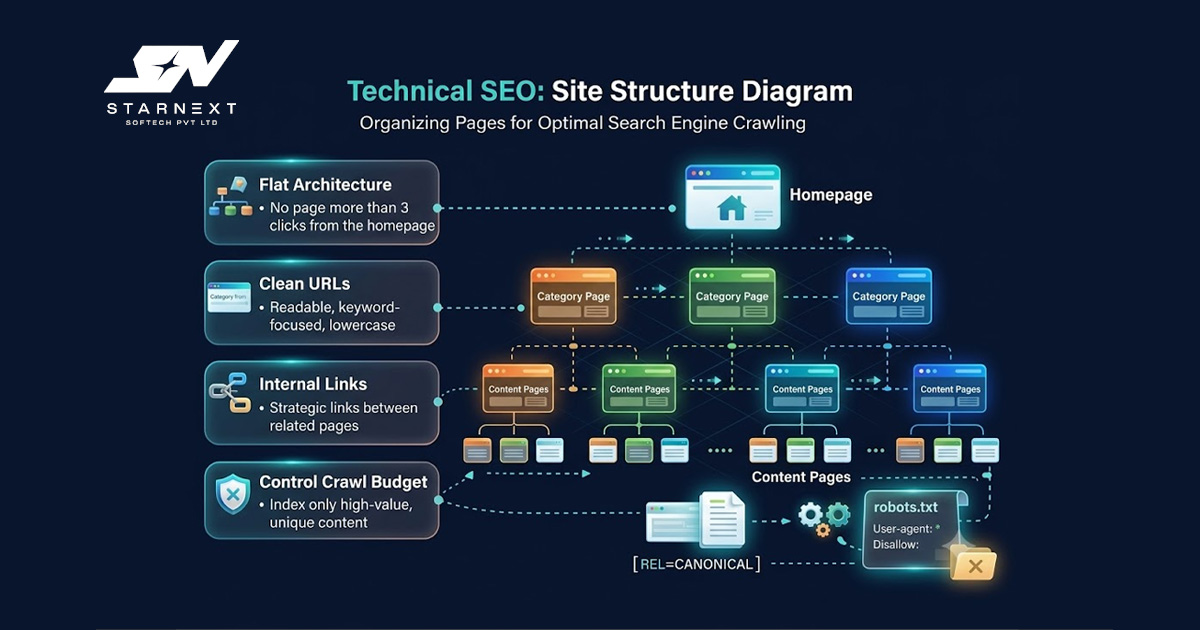
- Check click depth: Core commercial pages should normally be no more than a few logical clicks from the homepage or a well defined hub page.
- Find orphan pages: These are URLs that are not linked to internally.They are easy to miss and difficult for crawlers to prioritize.
- Repair broken links and redirect chains: A single 301 is normal during a migration. Several hops before a page loads waste time. Make maintenance harder.
Keep the XML Sitemap Honest
Your XML sitemap is a recommendation, not an indexing switch. It should list canonical URLs that return a 200 status code. Remove redirects, 404 pages, parameters, noindexed URLs and temporary test pages. A lean sitemap makes it easier to spot coverage problems in Google Search Console.
Review it after a CMS release, redesign or product import. Those are the moments when thousands of low-value URLs often appear quietly.
Control Indexation Deliberately
Indexing is a business decision much as a technical one. Search result pages, site-search URLs, thin tag archives, duplicate filter combinations and staging environments rarely deserve a place in Google's index. Use noindex when a page must remain accessible to users but should not compete in search. Use tags where closely similar URLs need one preferred version.
Do not block a page in robots.txt. Then expect Google to process its noindex directive. If Google cannot crawl the page it may not see the directive. That small conflict causes confusion than it should.
Speed and Core Web Vitals: Fix the Experience, Not the Score
Performance matters because a slow page interrupts the moment a visitor is ready to act. A restaurant guest trying to open a menu, a patient checking clinic hours or a buyer comparing a product should not wait while ten marketing scripts compete for browser resources.
Use field data in Google Search Console and PageSpeed Insights to understand real-user experience. Lab scores are useful for diagnosis. They are not the same as how visitors experience your pages on ordinary devices and networks.
The Metrics Worth Watching
- Contentful Paint (LCP): Shows how quickly the main visible content appears. Improve it by reducing server response time optimizing the hero image preloading the assets avoiding render-blocking resources.
- Interaction to Next Paint (INP): Measures responsiveness after a click, tap or key press. Long JavaScript tasks, overloaded tag managers, chat widgets and complex filter controls often create INP.
- Cumulative Layout Shift (CLS): Tracks unexpected movement on the page. Reserve space for images, ads, embedded media and banners so users do not tap the element.
Do not make speed work a contest to remove every script. Start with scripts that delay rendering, block interaction or provide commercial value. A live chat tool that creates a 700 ms interaction delay on checkout may cost more than it contributes.
JavaScript Rendering: Check What Google Actually Receives
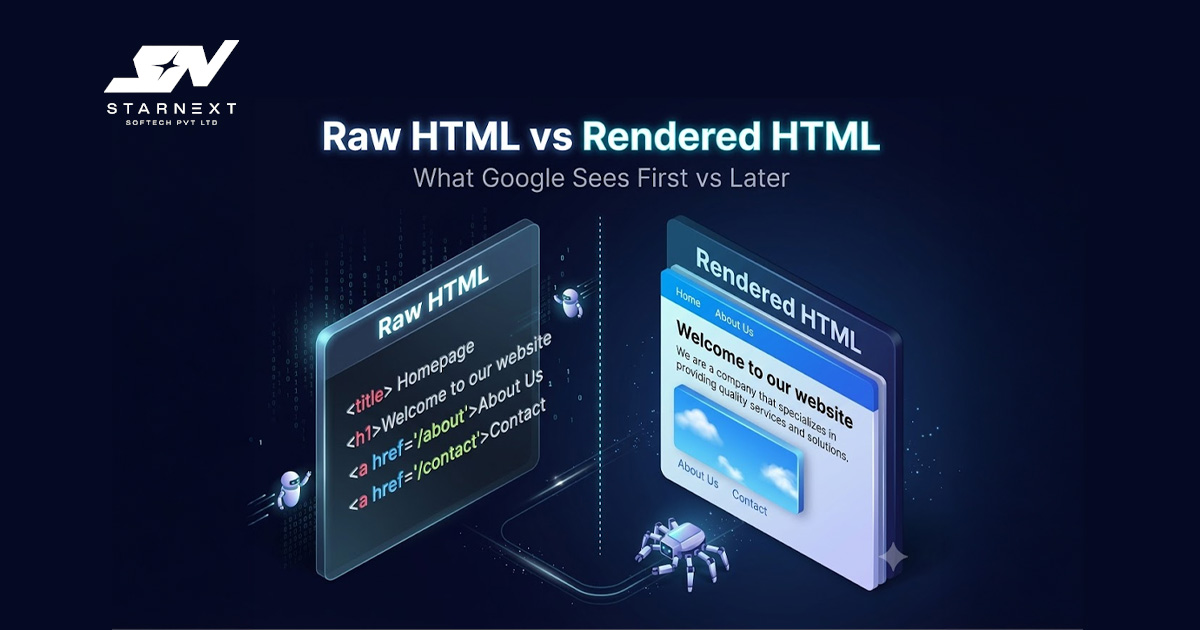
Many sites look complete in a browser but send empty HTML to a crawler before JavaScript runs. Google can process JavaScript. Rendering is more resource-intensive than reading server-delivered HTML. Critical content, internal links, titles and product information should not depend entirely on a client-side application finishing successfully.
Open a page and compare "View Source" with what you see after the page has loaded. Then use Google Search Console's URL Inspection tool to review the crawled and rendered version.
If key copy or links are absent from the source and inconsistently rendered later, involve your website development team.
Practical Rendering Priorities
- Use server-side rendering or static generation for pages that must rank quickly such as service, product, category and location pages.
- Keep navigation and important internal links in crawlable HTML links not click-only JavaScript controls.
- Test cookie banners, geo-targeting and personalization. A feature that works for an user can accidentally conceal page content from a crawler.
- Watch infinite scroll implementations. Provide crawlable URL paths when more content needs to be discovered.
Architecture and Internal Links Tell Google What Matters
A site structure should reflect how customers think, not how a CMS happened to store pages. A home-services company for example may need hubs for each service, each operating area and useful supporting guides. A visitor looking for emergency plumbing in Pune should not have to navigate through four menu levels to reach the relevant service page.
Internal links supply context well as pathways. "See our emergency plumbing service" is more informative than "click here." Use natural anchor text links from pages and give priority URLs several meaningful routes from topic-related content.
Structured Data Clarifies, But Does Not Replace, Quality
Schema markup helps search engines interpret entities and page relationships. Depending on the page useful implementations can include Organization, LocalBusiness, Product, Service, Article, FAQPage, BreadcrumbList and Review markup where accurate.
Markup should reflect information. Adding ratings invented availability or irrelevant schema is not optimization; it creates a trust problem. Validate implementation with Google's Rich Results Test then check for warnings after template changes.
For AI-assisted discovery the same principle applies: clear names, consistent business information, structured facts, labelled sections and accessible content reduce ambiguity. There is no AI ranking trick." The durable approach is making reliable information easy to retrieve and verify.
Mobile, Security and International Signals
Google's mobile-first approach means the mobile version must contain the content, metadata, internal links and structured data you expect to rank. A stripped-down mobile site may look tidy. It can weaken visibility if it omits key information available on desktop.
- Confirm every important page loads securely over HTTPS without mixed-content warnings.
- Test forms, menus, filters and buttons that ask people to take action on a mobile phone, not just on a computer simulator.
- If your website works in countries or languages check the hreflang tags return links, the main addresses for pages and the combinations of language and region carefully.
Common Audit Mistakes That Waste Time
The biggest error is looking at a crawl report and thinking it is a list of things to fix. Tools show problems. They don't know what is most important for your business. Five missing descriptions on PDFs are not as important as a noindex tag on your most profitable service page.
Other expensive mistakes are sending large sitemaps, making thousands of filtered URLs without a plan, starting a new website without knowing how to move old URLs and adding every tracking script that a vendor asks for. Technical SEO gets better when the marketing team, the development team, the design team and the analytics team all work together and make choices.
A Smart Audit Process for 2026
- 1.Check if pages are being indexed: Compare the list of URLs with what Google Search Console shows what the sitemap says and what the crawl results say.
- 2. Fix issues blocking access: Fix noindexed pages. Robots files. Broken links in the site. Loops in redirects. Mistakes with canonical tags.
- 3. See real people using the site:Focus on pages with data that are important for traffic or sales.
- 4. Verify page display:Google Search Console and a crawler that can handle Javascript to test page designs with the source code.
- 5. Improve the structure: Reduce the number of clicks to get to important pages, remove places where crawlers can get trapped, make it easier to get to the important pages.
- 6.Keep everything running smoothly: Watch after updates, moves, changes to templates and adding tracking tools.
Final Thoughts
A good technical base does not always mean you will be first on Google. It does something important: it stops problems from keeping your best content from showing up in search. This is more important as websites get more complex and search gets more picky.
Use this SEO checklist to protect the pages that are most important not to look perfect. When technical choices are connected to being easy to crawl, good for users and match what people are looking for, the work is easier to organize, much more likely to help with search results.