Common Website Mistakes That Are Killing Your Business Growth
A website can look impressive and still lose business. Visitors may arrive through search, social media or a paid advertisement, spend a second on the homepage and leave without understanding what you offer, why they should trust you or what to do next.
That is the cost of common website design mistakes. They do not always cause failure. Instead they quietly reduce enquiries, weaken credibility and make every marketing rupee or dollar work harder than it should. A strong website should support the growth journey from discovery to enquiry, purchase, booking or repeat business.
For a business such as StarNext Softech, which provides website development, SEO and digital marketing services the website is more than a service showcase. It is proof that the business understands user experience, performance, search visibility and conversion.
Why Website Problems Become Growth Problems
Many businesses treat their website as a one‑time project. It gets launched, receives content updates and then remains untouched while customer expectations, devices, search behaviour and competitors change.
That creates a gap. A website may still function. It may no longer answer the questions a prospective customer has before contacting you. The design may feel outdated and the service pages may be vague. The mobile experience may make it difficult to complete a simple enquiry.
Website mistakes that affect business growth usually show up in one of four ways:
- Fewer people find the website through search.
- Visitors leave before understanding the offer.
- Users struggle to complete a form, make a call or complete a purchase.
- The business appears more credible than competitors with clearer and faster websites.
None of these problems is always caused by one flaw. Often it is the combination of loading, unclear messaging, weak mobile design, confusing navigation and missing proof.
The Most Common Website Design Mistakes
A Homepage That Explains the Business but Not the Customer’s Problem
A homepage should not begin with a description of the company. It should quickly make clear who the business helps, what problem it solves and what the visitor should do next.
Consider a marketing agency whose homepage says, "We provide innovative digital solutions." That phrase could describe hundreds of agencies. A clearer version would say, "We help local businesses generate leads through SEO, paid advertising and conversion‑focused websites."
Specific language gives visitors a reason to stay. It also helps them decide whether your business is relevant to their needs before they scroll further.
Weak Calls to Action and Unclear Next Steps
“Contact us" is not always enough. Visitors need to know what will happen after they click. A clear call to action reduces hesitation because it sets expectations.
- Get a free website audit
- Book a 20‑minute consultation
- Request a project estimate
- See pricing and packages
- Talk to a specialist
The call to action should match the visitor’s stage. Someone researching services may want a checklist, guide or portfolio. Someone ready to buy may prefer a consultation, quotation or booking form.
Cluttered Layouts That Hide the Main Message
Many sliders, pop‑ups, animations, badges and competing buttons can make a page feel busy without making it more persuasive. Visitors should be able to identify the message within seconds.
A practical test is simple: cover the page with your hand, reveal it for five seconds then ask someone what the business does and what action they should take. If they cannot answer both questions the design needs simplification.
This does not mean a website must look plain. It means every visual element should support a purpose. A dental clinic for example may use appointment buttons, service explanations, doctor credentials, patient reviews and location details. A restaurant may prioritise menus, reservation options, photographs, opening hours and directions.
Technical and Development Errors That Reduce Results
Slow Loading Pages
Speed affects both user experience and search performance. Google’s Core Web Vitals measure real‑world loading performance, responsiveness and visual stability. Google recommends aiming for a Contentful Paint within 2.5 seconds, an Interaction to Next Paint below 200 milliseconds and a Cumulative Layout Shift below 0.1.
Slow websites often suffer from images, excessive third‑party scripts, poorly configured plugins, unnecessary animations and unoptimised code. A business may spend heavily on ads then lose leads because the landing page takes too long to load on mobile data.
Speed is especially important for service businesses. A person searching for an emergency plumber, dentist, salon or electrician may be comparing options at once. If one website loads slowly or shifts while loading the visitor may simply choose another result.
Broken Links, Outdated Plugins and Poor Mobile Behaviour
Common website development errors are not always visible on a desktop screen. A form may fail on mobile, a button may overlap text a page may redirect incorrectly. An outdated plugin may create security and compatibility issues.
These problems matter because they interrupt the moment a visitor decides to act. If a contact form does not submit the user rarely returns to try
- Test every form on mobile: A form that works on a desktop may fail on a screen because of field size, validation errors or layout issues.
- Check all external links: Broken links make a business appear maintained and can waste valuable traffic.
- Update Themes
- carefully: Outdated components can create security risks, compatibility problems and slow page loading.
- Avoid redirects: Too many redirects can slow down the user journey and create confusion for search engines.
Websites Google Cannot Properly Crawl or Understand
A website can have content and still perform poorly if search engines cannot access or interpret it properly. Google advises making sure it can see pages much as a user does, avoiding hidden resources using logical site structure and ensuring pages are reachable through internal links.
Basic technical checks should include:
- HTTPS across the entire website.
- Mobile‑friendly layouts and readable text.
- Clear internal linking between service, location and content pages.
- A submitted XML sitemap.
- Accurate page titles, meta descriptions and headings.
- No accidental noindex tags on pages.
- Clean handling of duplicate or outdated URLs.
Google also notes that it now uses a crawler as the default for websites. This makes mobile usability a foundational requirement rather than an optional enhancement.
Content Mistakes That Reduce Trust
Writing, for the Business of the Buyer
Many service websites describe features before explaining outcomes. "We offer web design, SEO and social media marketing" is factual but it does not immediately tell a business owner why those services matter.
A useful approach is to connect each service to a business result.
| WHAT THE BUSINESS OFFERS | WHAT THE CUSTOMER ACTUALLY WANTS |
|---|---|
| SEO services | More qualified search traffic and enquiries |
| Website development | A fast credible site that converts visitors |
| Social media marketing | Brand awareness and a steady flow of leads |
| Google Ads | Faster visibility and measurable campaign performance |
The offer does not change. The explanation becomes more relevant. By saying "We build websites " explain that you build websites designed to load quickly, communicate clearly and turn visitors into enquiries.
Missing Proof, Pricing Guidance and Objection Handling
Visitors often hesitate because they cannot find information to feel confident. They may wonder about timelines, process, pricing, support, results or whether the provider understands their industry.
Add proof where it naturally supports the decision:
- Client results with context rather than vague claims.
- Case studies that explain the problem, approach and outcome.
- Team profiles or real photographs.
- Clear service scope and deliverables.
- FAQs that address concerns.
- Transparent contact and response expectations.
Avoid inventing results. If you do not yet have client data, show process, expertise, credentials or examples of work instead. Honesty builds durable trust rather than exaggerated promises.
How to Improve Website Performance

Start With the Pages That Drive Revenue
Do not try to fix every page at. Identify the pages that receive traffic and contribute to business outcomes: homepage, main service pages, landing pages, contact page, pricing page and top blog articles.
For each page review:
- Does it load quickly on mobile?
- Is the primary offer clear?
- Is there one next action?
- Does the content answer the visitor’s question?
- Are forms short and easy to complete?
- Are trust signals visible near the call to action?
This creates a starting point for website optimization for business growth. It also prevents teams from spending weeks redesigning pages that receive traffic or contribute little to sales.
Improve Speed Without Ruining the Experience
How to improve website performance is often less about chasing a score and more about removing friction. Resize images, use modern image formats where appropriate limit unnecessary scripts enable caching and avoid heavy page builders or plugins that add little value.
Google’s Search Console Core Web Vitals report uses real‑world usage data and groups page performance by mobile and desktop making it useful for identifying recurring issues across page templates.
A fast website should still look polished. The goal is not the possible page at any cost; it is a page that loads quickly, remains stable and helps the visitor act.
Make Conversion Easier, Not More Aggressive
Pop‑ups, chat widgets, exit‑intent offers and lead forms can support growth only when they do not obstruct the content. Google specifically warns that intrusive interstitials and dialogs can frustrate users, reduce trust and make it harder for search engines to understand content.
Use smaller dismissible prompts instead of full‑screen interruptions. Make the value of the offer clear and do not ask for information than necessary. A short form with name, phone number and service requirement will often produce enquiries than a long form that asks for unnecessary details.
A Simple Website Growth Checklist
Use this checklist before launching a site or reviewing an existing one:
- State the core offer in the first screen.
- Use one call to action per page.
- Test every form, button, phone link and checkout step on mobile.
- Compress. Remove unused scripts or plugins.
- Ensure HTTPS is active across all pages.
- Check that important pages are indexed and internally linked.
- Add service pages rather than relying only on a homepage.
- Publish content that answers customer questions.
- Include credible proof near decision points.
- Review analytics to find pages with traffic but low conversion.
Mistakes Businesses Should Stop Making
Some website problems persist because they are mistaken for practices.
- Adding pages without a purpose. More content does not automatically improve rankings; useful well‑structured content does.
- Prioritising appearance over usability. A beautiful site that confuses visitors will not generate leads.
- Copying competitors. Their wording, structure and offers may not match your positioning or customer needs.
- Ignoring visitors. Google notes that most searches now occur on devices.
- Treating SEO as a task. Content, design, speed, structure and conversion all affect whether a visitor becomes a customer.
- Measuring traffic. Traffic matters. Enquiries, qualified leads, bookings and sales show whether the website supports growth.
What AI Search Changes for Websites
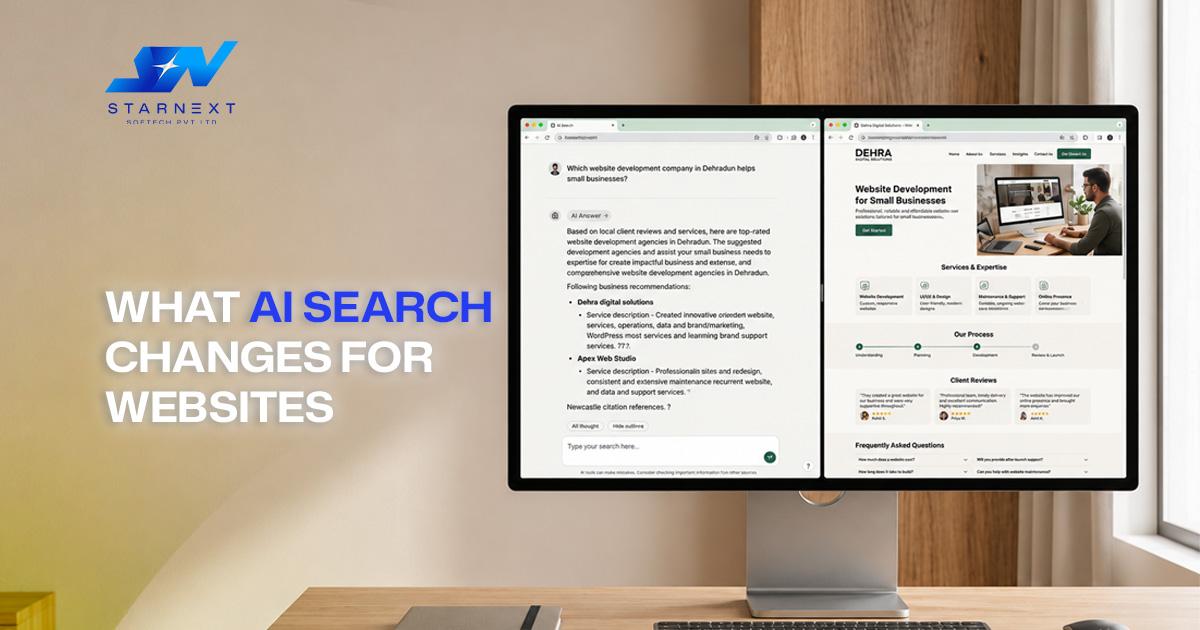
AI‑driven search does not remove the need for a website. It raises the standard for clarity, accuracy and consistency.
When someone asks an AI assistant or search engine, "Which website development company in Dehradun helps small businesses improve leads?" the system needs to understand what your business offers, who it serves and why it is credible. Clear service pages, business information, useful FAQs, genuine reviews and well‑structured content make that easier.
This does not mean filling pages with keywords. It means creating pages that answer questions with useful detail. Google’s SEO guidance emphasises helping search engines understand content and helping users find what they need.
For example a business page that clearly explains its services, service areas, pricing approach, process, team expertise and customer questions is easier for both people and AI systems to understand than a page filled with marketing claims.
Final Thoughts
A website should not merely exist online. It should make the next step obvious, reduce doubt load reliably and give visitors a reason to choose your business.
The biggest growth opportunity is rarely one redesign. It is usually a series of improvements: clearer messaging, faster mobile pages, easier contact options, stronger proof and content that answers real customer questions. Fix those areas first, measure the impact and keep improving based on what visitors do.
A business that treats its website as a living growth asset will usually outperform one that treats it as a project.